You signed in with another tab or window. Reload to refresh your session.You signed out in another tab or window. Reload to refresh your session.You switched accounts on another tab or window. Reload to refresh your session.Dismiss alert
{{ message }}
This repository was archived by the owner on Nov 6, 2023. It is now read-only.
Repository navigation
This repository was archived by the owner on Nov 6, 2023. It is now read-only.
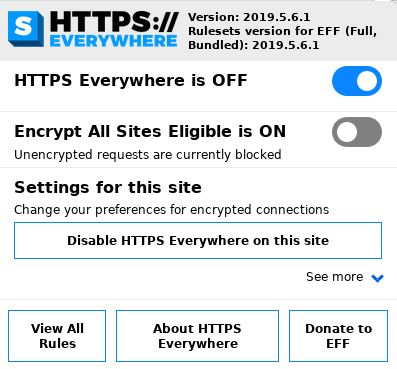
Popup info is showing opposite of actual status #17918
With the popup open, clicking on EASE to ON reloads the page and says "Encrypt all sites eligible is ON". Then toggle EASE to OFF and clicking away from the popup then opening the popup again says "Encrypt all sites eligible is ON".
Actually, clicking the EASE toggle does not close the popup. Only the main ON/OFF toggle closes the popup.

Activity
zoracon commentedon May 7, 2019
When you turn these on and off. Does the pop-up window close for you a second afterward? Or not at all?
gms77 commentedon May 7, 2019
Yes, the popup closes after toggling on or off.
gms77 commentedon May 7, 2019
With the popup open, clicking on EASE to ON reloads the page and says "Encrypt all sites eligible is ON". Then toggle EASE to OFF and clicking away from the popup then opening the popup again says "Encrypt all sites eligible is ON".
Actually, clicking the EASE toggle does not close the popup. Only the main ON/OFF toggle closes the popup.
pipboy96 commentedon May 8, 2019
For me it's just stuck on OFF, slider position does not affect the text.
pipboy96 commentedon May 8, 2019
Closed by #17919.