You signed in with another tab or window. Reload to refresh your session.You signed out in another tab or window. Reload to refresh your session.You switched accounts on another tab or window. Reload to refresh your session.Dismiss alert
I'm currently trying to build the project to work on my side, but I can't get past config_tsc_debug.bat
I'm building using Visual Studio 16 2019
C:\Users\Administrator\Desktop\BetterElytraBot\TypeScriptCompiler\__build\tsc>cmake ../../tsc -G "Visual Studio 16 2019" -A x64 -DCMAKE_BUILD_TYPE=Debug -Wno-dev
-- Selecting Windows SDK version 10.0.19041.0 to target Windows 10.0.19045.
-- MLIR_DIR is C:/Users/Administrator/Desktop/BetterElytraBot/TypeScriptCompiler/3rdParty/llvm/debug/lib/cmake/mlir
-- CMAKE_VS_PLATFORM_TOOLSET_HOST_ARCHITECTURE was x64 and set to x64
CMake Error at CMakeLists.txt:62 (find_package):
Could not find a package configuration file provided by "MLIR" with any of
the following names:
MLIRConfig.cmake
mlir-config.cmake
Add the installation prefix of "MLIR" to CMAKE_PREFIX_PATH or set
"MLIR_DIR" to a directory containing one of the above files. If "MLIR"
provides a separate development package or SDK, be sure it has been
installed.
-- Configuring incomplete, errors occurred!
See also "C:/Users/Administrator/Desktop/BetterElytraBot/TypeScriptCompiler/__build/tsc/CMakeFiles/CMakeOutput.log".
See also "C:/Users/Administrator/Desktop/BetterElytraBot/TypeScriptCompiler/__build/tsc/CMakeFiles/CMakeError.log".
then u need to open "tsc" folder and run 2 bats: config_tsc_debug.bat and then build_tsc_debug.bat
I found out that I needed more than 120 GB of storage to build it so I made some space and restarted
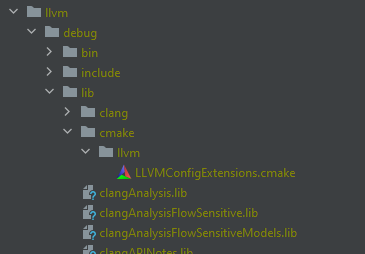
This is how it looks like, now
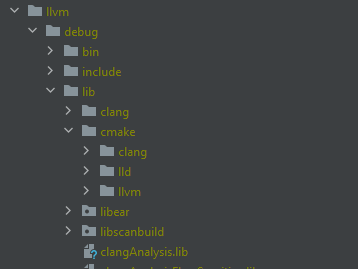
But it looks like there's still some missing folders
I did find an error and a warning from prepare_3rdParty.bat
CMake Warning (dev) at C:/Program Files/CMake/share/cmake-3.24/Modules/GNUInstallDirs.cmake:243 (message):
Unable to determine default CMAKE_INSTALL_LIBDIR directory because no
target architecture is known. Please enable at least one language before
including GNUInstallDirs.
Call Stack (most recent call first):
C:/Users/Administrator/Desktop/BetterElytraBot/TypeScriptCompiler/3rdParty/llvm-project/llvm/cmake/modules/LLVMInstallSymlink.cmake:5 (include)
tools/llvm-ar/cmake_install.cmake:48 (include)
tools/cmake_install.cmake:39 (include)
cmake_install.cmake:69 (include)
This warning is for project developers. Use -Wno-dev to suppress it.
CMake Error at tools/mlir/lib/Dialect/MemRef/Transforms/cmake_install.cmake:37 (file):
file INSTALL cannot find
"C:/Users/Administrator/Desktop/BetterElytraBot/TypeScriptCompiler/__build/llvm/debug/lib/MLIRMemRefTransforms.lib":
No such file or directory.
Call Stack (most recent call first):
tools/mlir/lib/Dialect/MemRef/cmake_install.cmake:38 (include)
tools/mlir/lib/Dialect/cmake_install.cmake:66 (include)
tools/mlir/lib/cmake_install.cmake:40 (include)
tools/mlir/cmake_install.cmake:55 (include)
tools/cmake_install.cmake:45 (include)
cmake_install.cmake:69 (include)
I could potentially restart the entire installation and then redirect the output to a file because the terminal wasn't able to keep everything, so there might be some additional important errors that were not showed in this
CMake Warning (dev) at C:/Program Files/CMake/share/cmake-3.24/Modules/GNUInstallDirs.cmake:243 (message):
Unable to determine default CMAKE_INSTALL_LIBDIR directory because no
target architecture is known. Please enable at least one language before
including GNUInstallDirs.
Call Stack (most recent call first):
C:/Users/Administrator/Desktop/BetterElytraBot/TypeScriptCompiler/3rdParty/llvm-project/llvm/cmake/modules/LLVMInstallSymlink.cmake:5 (include)
tools/llvm-ar/cmake_install.cmake:48 (include)
tools/cmake_install.cmake:39 (include)
cmake_install.cmake:69 (include)
This warning is for project developers. Use -Wno-dev to suppress it.
CMake Error at tools/mlir/lib/Dialect/MemRef/Transforms/cmake_install.cmake:37 (file):
file INSTALL cannot find
"C:/Users/Administrator/Desktop/BetterElytraBot/TypeScriptCompiler/__build/llvm/debug/lib/MLIRMemRefTransforms.lib":
No such file or directory.
Call Stack (most recent call first):
tools/mlir/lib/Dialect/MemRef/cmake_install.cmake:38 (include)
tools/mlir/lib/Dialect/cmake_install.cmake:66 (include)
tools/mlir/lib/cmake_install.cmake:40 (include)
tools/mlir/cmake_install.cmake:55 (include)
tools/cmake_install.cmake:45 (include)
cmake_install.cmake:69 (include)
I tried that multiple times
The 4 first builds were all different
And the 2 latests builds ended up with the same content
I'm not exactly sure what exactly could cause this, maybe I have to use Visual Studio 17 2022 instead of 16 2019 but I can't get the compiler to be recognized with this version
Activity
ASDAlexander77 commentedon Mar 13, 2023
you need to run prepare_3rdParty.bat and ensure that it finished
ASDAlexander77 commentedon Mar 13, 2023
then u need to open "tsc" folder and run 2 bats: config_tsc_debug.bat and then build_tsc_debug.bat
emyfops commentedon Mar 13, 2023
I found out that I needed more than 120 GB of storage to build it so I made some space and restarted
This is how it looks like, now

But it looks like there's still some missing folders
I did find an error and a warning from prepare_3rdParty.bat
I could potentially restart the entire installation and then redirect the output to a file because the terminal wasn't able to keep everything, so there might be some additional important errors that were not showed in this
emyfops commentedon Mar 14, 2023
I built the project again
Here are the errors
ASDAlexander77 commentedon Mar 14, 2023
try do delete __build folder and try again
ASDAlexander77 commentedon Mar 14, 2023
just ensure there are no errors during compile process
emyfops commentedon Mar 14, 2023
I tried that multiple times
The 4 first builds were all different
And the 2 latests builds ended up with the same content
I'm not exactly sure what exactly could cause this, maybe I have to use Visual Studio 17 2022 instead of 16 2019 but I can't get the compiler to be recognized with this version
ASDAlexander77 commentedon Mar 16, 2023
before I was using VS 16 2019 so it should be fine, but maybe something changed as I moved to LLVM 15.0.7.
ASDAlexander77 commentedon Mar 16, 2023
try to use "ninja" build tools
emyfops commentedon Mar 16, 2023
Are you building on linux ?
I will try to build the project in linux to see if it works with ninja