Repository navigation
Extension just shows loading when working with numpy and pandas. #881
Description

Bug: Notebook Editor, Interactive Window, Editor cells
Steps to cause the bug to occur
- All I see is this loading whenever working with data science...
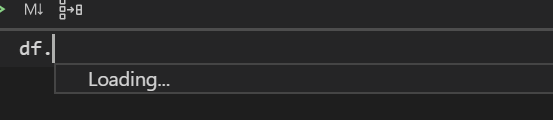
Actual behavior
Expected behavior
Your Jupyter and/or Python environment
Please provide as much info as you readily know
- Jupyter server running: Local | Remote | N/A
- Extension version: 20YY.MM.#####-xxx
- VS Code version: #.##
- Setting python.jediEnabled: true | false
- Setting python.languageServer: Jedi | Microsoft | None
- Python and/or Anaconda version: #.#.#
- OS: Windows | Mac | Linux (distro):
- Virtual environment: conda | venv | virtualenv | N/A | ...
Developer Tools Console Output
Microsoft Data Science for VS Code Engineering Team: Rich Chiodo (@rchiodo), Ian Huff (@IanMatthewHuff), David Kutugata (@DavidKutu), Don Jayamanne (@DonJayamanne), Jim Griesmer (@greazer), Joyce Er (@joyceerhl)
Activity
joyceerhl commentedon Jul 4, 2020
Hey Akshit Gupta (@akshitgupta29), thanks for reporting this bug! Could I ask what the
python.jediEnabledandpython.languageServersettings are set to for your machine? You can find this in VS Code by hitting Command+Shift+P and typing in 'Preferences: Open settings (JSON)'.akshitgupta29 commentedon Jul 6, 2020
Hi Joyce Er (@joyceerhl)
"python.jediEnabled": false,
"python.languageServer": "Microsoft",
joyceerhl commentedon Jul 7, 2020
Yep, I repro this locally, and I was able to fix it by switching language servers. Our sister team just shipped a new language server called Pylance, which you can install from the VS Code extension marketplace. Installing Pylance and switching language servers resolved the issue for me—could you try it out and let me know if that fixes the problem for you?
akshitgupta29 commentedon Jul 7, 2020
Joyce Er (@joyceerhl) Thanks for your help. I have installed Pylance and it is working as expected. Thanks for the help.
Though I see an error in JSON file like this:
Please update the JSON file structure as well.
joyceerhl commentedon Jul 7, 2020
Awesome, glad to hear Pylance helped resolve the issue, and thanks for reporting the error! I've submitted a fix for this in microsoft/vscode-python#12788.
akshitgupta29 commentedon Jul 9, 2020
Hi Joyce Er (@joyceerhl), now my packages are working fine, but I am missing that document for each function that used to be there in the MS languageServer. Any plan to have it in the pylance as well?