
- Introduction
- Project Description
- Features
- Authors - Achievement
- Getting Started
- Command Execution Logic (Binary Tree)
- Command List for Tests
- Minishell tester
Welcome to the Minishell project repository. This project is a simple shell program developed as a school assignment. It is designed to provide basic shell functionality, including command execution, history management, input/output redirection, and more.
Minishell is a command-line shell that replicates some of the functionality of a typical Unix shell. It is a minimalistic shell designed to be a learning exercise for working with system calls, processes, and various Unix commands.
- Display a prompt for entering commands.
- Support for command history.
- Execute commands based on the PATH variable or absolute/relative paths.
- Input/output redirection using
<,>,>>, and<<. - Pipe (
|) support for command chaining. - Handle environment variables (e.g.,
$VAR) and$?for exit status. - Implement built-in commands like
echo,cd,pwd,export,unset,env, andexit. - Handle signals such as Ctrl-C, Ctrl-D, and Ctrl-\ in interactive mode.
Authors - Luis Balsa - Adam Kirst
We are proud to announce that we achieved the maximum score of 125 for this project.
- C compiler (e.g., GCC)
- UNIX-like operating system (Linux or macOS)
-
Clone this repository to your local machine.
git clone https://github.com/yourusername/minishell.git
-
Navigate to the project directory.
cd minishell -
Build the Minishell program.
make
-
Run Minishell.
./minishell
-
Enter commands at the prompt and press Enter to execute them.
-
Use features like input/output redirection, pipes, and built-in commands as needed.
In this Minishell project, we implemented a binary tree data structure to manage the execution of commands and their associated operations like input/output redirection, piping, and logical operators (&&, ||).
The heart of our command execution logic lies in the parsing of tokens from the user's input and constructing a binary tree structure that represents the command execution sequence. Here are the key components of this process:
We use the gettoken and gettoken_type functions to tokenize the user's input into different types of tokens. Tokens can be commands, operators, or arguments.
We start by parsing pipelines, which are sequences of commands separated by pipe operators |. Each pipeline is represented as a node in the binary tree.
For each command within a pipeline, we parse the command and its associated elements such as arguments, input/output redirection, and logical operators. The parseexec function handles this part.
The parseredir function is responsible for detecting and handling input/output redirection operators (<, >, >>, <<) and creating nodes in the tree to represent these operations.
We support logical operators && and ||, which allow for conditional execution of commands based on the success or failure of previous commands. These operators are handled in the parseline function.
As we parse the input, we construct a binary tree structure where each node represents a command or an operation. The tree structure dictates the order of command execution.
Once the binary tree is constructed, we traverse it to execute the commands in the correct order. The run_cmd function is responsible for executing individual commands based on their type:
- For regular external commands, we use
execveto execute them. - For built-in commands (e.g.,
cd,echo), we have dedicated functions to handle their execution. - For input/output redirection and piping, we manage file descriptors accordingly.
- Logical operators (
&&and||) control the conditional execution of commands.
Here's an example of how our binary tree logic works for a command like:
ls -l | grep myfile && echo "File found" || echo "File not found"- We tokenize the input into commands and operators.
- We build a binary tree that represents the sequence of commands and operations.
- The tree structure ensures that
ls -lis executed first, followed bygrep myfile. Depending on the success of these commands, eitherecho "File found"orecho "File not found"is executed.
This binary tree-based approach allows us to handle complex command sequences and control their execution effectively.
If you're interested in delving deeper into the binary tree logic used in this Minishell project, we recommend watching the following educational videos. These videos provide detailed explanations and examples of how to build a shell with a similar binary tree-based approach:
-
- This video tutorial walks you through the process of building a Unix-like shell in the C programming language. It covers various aspects of shell development, including tokenization, parsing, and command execution using a binary tree structure.
-
- In this video lecture, you'll find an in-depth explanation of creating a Linux shell in C. The video explores the design and implementation of a shell using binary trees, covering topics such as command parsing, redirection, and logical operators.
These videos can be valuable resources for gaining a deeper understanding of the binary tree logic employed in this Minishell project. They provide practical insights and examples that align with the concepts discussed in this README.
echo ~Print the home directory of the current user
exit > file 123It should create a "file" file and it should exit with a 123 return
cat <<e | grep hello | grep hello | grep world | grep -o l | wc -lA complex pipeline of text processing commands
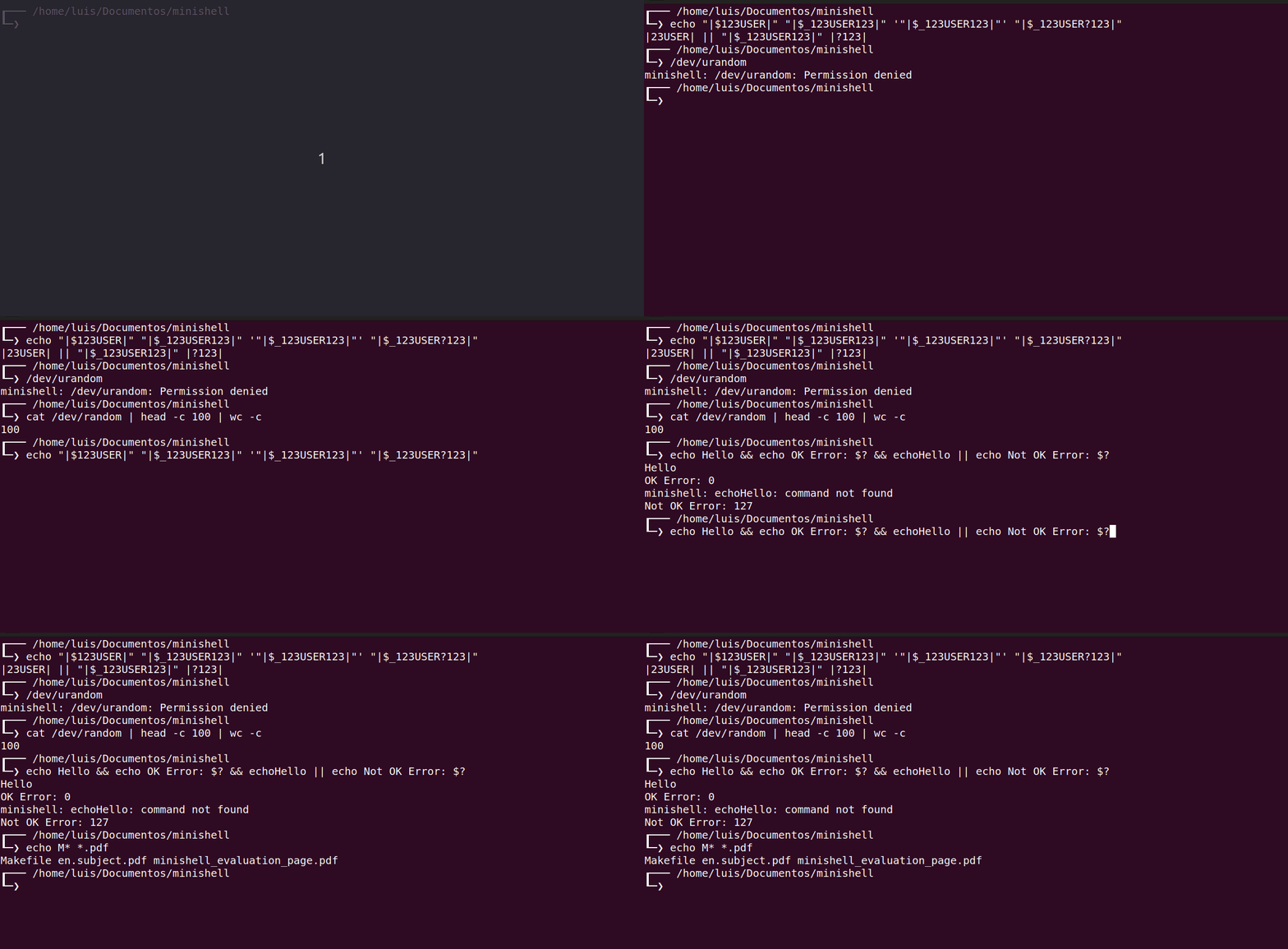
cat /dev/random | head -c 100 | wc -cGenerate random data and count the number of characters
env -i ./minishellRun the minishell with a clean environment
/dev/urandomYou should see:
minishell: /dev/urandom: Permission denied
sleep 5 | sleep 5 | sleep 5Should return in 5 seconds
"ls > 1 > 2 > 3"When you don't have the right permissions on file 2
ls -l | wc -lThen run
ls -l | wc -l > aqui(the second command creates a file called 'aqui', and this file counts)
cat < input.txt | wcIf
input.txtdoes not exist You should see:
minishell: input.txt: No such file or directory
      0       0       0
cat << $USER $USER
> $USER
You should see:
cat: luide-so: No such file or directory
echo " ' $ ' " don't expandThe text within single quotes is treated literally
notcmdThen run
exit,echo $?should return 127
notexists < input.txt | notexists2 | notexists3If
input.txtdoes not exist
notcmd1 && (notcmd2 || echo $?)vs.
notcmd1 && notcmd2 || echo $?Check the difference in the logic of these commands
cat <fileYou should see:
minishell: file: No such file or directory
touch fileCreate a file
chmod 000 fileRemove all permissions from the file
cat <fileYou should see:
minishell: file: Permission denied
asdsadYou should see:
minishell: asdsad: command not found
$EMPTYVARShow a new prompt line
echo $?Should return 0
sadasdads | $EMPTYVARYou should see:
minishell: sadasdads: command not found
echo $?Should return 0
ls | cat -e", setup="touch a b c dYou should see:
cat: invalid option -- ','
echo bonjour | | cat -eYou should see:
minishell: syntax error near unexpected token '|'
asdf | echo bonjourYou should see:
bonjourand thenminishell: asdf: command not found
cat <$USE*You should see:
minishell: $USE*: ambiguous redirect
echo Hello && echo OK Error: $? && echoHello || echo Not OK Error: $?You should see:
Hello
OK Error: 0
minishell: echoHello: command not found
Not OK Error: 127
echo -"n" helloYou should see:
hello
echo -"n -nnnn" -n helloYou should see:
-n -nnnn -n hello
echo "|$123USER|" "|$_123USER123|" '"|$_123USER123|"' "|$_123USER?123|"You should see:
|23USER| || "|$_123USER123|" |?123|
We utilized the minishell_tester tool to validate our Minishell implementation. This tester is an essential resource for assessing the correctness and functionality of our Minishell program. It includes a suite of test cases and scripts designed to cover various aspects of shell behavior.